tl;dr. I’ve built backpack, a tool written in Rust that helps you use starter and template projects. I also explain what are the TEA and TEAM frameworks for productivity and how to manage Time, Energy and Attention with starter projects.
Stater projects are k ey to unlocking your productivity, for side-projects and hobbies, or experiments at work.
There’s value in creating your own starter projects from time to time, to learn some new technology or technique, and at the same time, using a public starter project to launch quickly.
From a productivity point of view, I often use the TEA (Time, Energy, Attention) framework or the TEAM (Time, Energy, Attention, and Motivation) framework.
What is the TEA / TEAM framework?
TEA and TEAM are acronyms to a framework that you can use to evaluate and create effective work for yourself or your team.
They stand for the what you should optimize for executing effectively:
- T — Time
- E — Energy
- A — Attention
- M — Motivation
Time
Use the 3 W’s: When, Wait, Worry when you’re planning your tasks and you want to figure out timing so that you feel comfortable with that specific task.
The idea is to put a system in place that will control and regulate our time investment and commitment.
To explain intuitively, think like a customer ordering a product. Ask these questions:
- (W)hen do I get it?
- How long do I (W)ait?
- When do I need to (W)orry about my order?.
For example, if I order a Pizza now, I know I should get it more or less at the time for my favorite TV show today, it should take 30 minutes, and if I don’t get it within 60 minutes I need to call the place and see what’s going on.
Let’s convert this to a tech task. Let’s say we want to add new functionality to our CI so that it will publish an npm package automatically. We know that building it should take around 30 minutes: get some Github Action, drop it into our workflow, set up some permissions, and then spend the rest of the time kicking the tires seeing that it works. That’s the Wait part.
But, if this becomes a 3 hour rabbit hole because there’s too much unknowns we didn’t expect (as often is with Github Actions), we know that we need to worry. So let’s set that as the time to raise a flag, stop, and park the task.
Next, what we want to do is decide when to do it, or when it should be at the “done” state. If you know you’re doing CI work on Wednesday, then that’s when.
To nail time, we’ve focused on the 3 W’s: When, Wait, Worry. Under the hood, we’ve sorted out:
- Scope: made sure we scope the task with a manageable chunk of time (30m), so: not too big.
- Flagging system: we outlined when to hard stop. Often a waste of time because we’re developing a tunnel vision — plowing straight ahead when the smarter thing to do is to stop and recalculate.
- Prioritization and commitment: by saying when, we’ve sorted out priority and committed ourselves to a goal.
Energy
Energy is about feeling empowered to complete your goals, and being able to understand your personal levels of energy through out your day.
It’s about hacking the system, and finding ways to boost your energy when you’re done, and to recognize and make use of your high energy levels when you’re feeling great.
The first step is to be mindful of when you’re not feeling great about your energy. The rest, is personal. As an example, for me, I take a short walk to boost my energy levels in mornings, and I make sure I have a system like GTD (Getting Things Done) as my own productivity ritual, but YMMV.
Attention
Attention is about your ability to stay focused through out the day. There are different ways to get at it, but often it’s about:
- Turning off IMs, interruptions
- Blocking out time, through calendar or otherwise
- Placing yourself in a different environment (I like coffee shops)
- Getting to a “flow” state of mind(I like specific kinds of music)
Motivation
Motivation is about making sure you know where you’re headed. Writing down the end goal to yourself, keeping some mantras written down, are the best way to remind yourself why you’re doing what you’re doing.
A good idea is to also revisit this from time to time, and to kill off projects that you’re not feeling great about anymore — it happens.
The destroyer of TEAM: starting up a new project
Starting up a project may be exciting for some, but for those who have a clear goal and motivation, it may be a killer of productivity. Typically when starting up a project you need to:
- Pick the tech stack, weigh in alternatives: paradox of options big time.
- Start building the tech stack, hit roadblocks and the reality of your previous choices
- Repeat until you have a stable starter project
- Implement all the boilerplate, infrastructure, policies
Although it may have been an exciting experience if this is your first time dealing with tech stack X or Y, by the time you’re done, you’re out of energy, you’ve depleted your time allowance, and your motivation has suffered a big blow.
How do starter projects help maintain TEAM
To work around this, I developed a habit of extracting starter projects from my most successful projects. I then made them into a repo, and created a script that clones, cleans up, and sets up a new project from that starter skeleton.
It’s funny, that bin folder tells my own personal story of self development over the last 10 years.
Here’s one of these init scripts:
#!/bin/sh
With time this became a reflex. Every time I wanted to start a project, I say init-foo , and I have a pristine, fully rigged with best practices starter project.
This helped me optimize TEAM:
- Time: by using a starter, I’ve de-risked time. The choices that are already made there gives me smooth sailing. I can guesstimate better, and commit safely.
- Energy: by not having so many choices, I’m keeping my energy fresh. The first line of code I write — is a business logic line of code.
- Attention: again, not reading about “X vs Y”, and “how to infrastructure X”, keeps my attention very clearly on my goal: building something useful.
- Motivation: getting a starter project that allows for saying
yarn startand you have a working, live, app is a motivation boost.
The missing part: supercharge the way you use starter projects
I started creating these little binaries over 10 years ago, but meanwhile, Github has supported a template repository type, which is what I did, and, smarter and brighter people have created a ton of starter and template projects.
I found that I needed a small tool to use different templates easily, so I built backpack . backpack is a super tool for using starter projects and templates directly from Github repos. If you want to use a starter project you do this:
How is this different from a git clone ?
- It’s faster(takes tarball by default or Git without history)
- Caches content, because people reuse starters (next time you
newa project, it'll be from local cache) - You can apply partial content to your project, such as specific folders, for example to copy the CI configuration, do
bp apply kriasoft/react-starter-git/-/.github - Allows to set up aliases so you can do
bp new react my-appwhich will map tokriasoft/react-starter-kitin your own project. - You can use shortlinks like
gl:foo/barfor Gitlab, orgh-acme:foo/barfor your own Github deployed instance - You can mix and match: get a branch or tag, and from that a subfolder, on a custom hosted Gitlab:
bp apply my-gl:foo/infra#v2.0.0/-/terraform, and map that to an alias:bp apply team-terraform. - And on the roadmap: custom hooks (automating install and set up copy), and variable swaps (to rename tokens in files)
Getting started
For macOS:
&&
Otherwise, grab a release from releases.
Using a starter project
A shortlink is a pointer to a Git repo which looks like this:
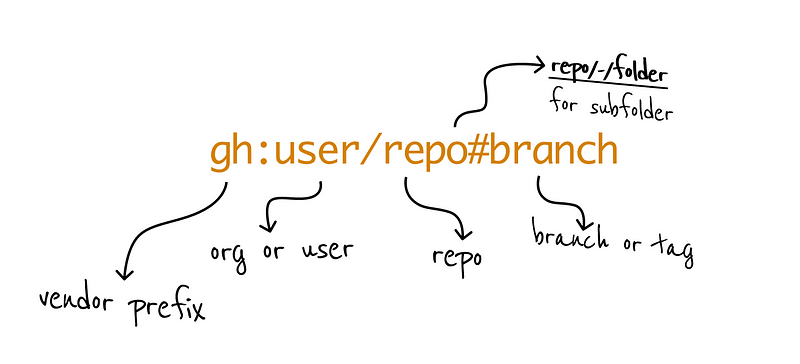
Any one of these is a legal shortlink:
user/repo -> resolves to https://github.com/user/repo
gl:user/repo -> resolves to https://gitlab.org/user/repo
user/repo/-/subfolder -> takes only 'subfolder'
user/repo#wip -> takes the 'wip' branch
So this will use a React starter:
Creating your own list of projects
You can configure your own list of favorite starters:
And then edit your aliases:
Example:
aliases:
  rust:
    shortlink: rusty-ferris-club/rust-starter  # you can use any custom prefix here too
    # is_git: true # fetch from ssh for private repos
And then this will always work for your user:
Copying parts of a starter or a repo
If you’d like to copy parts of a project, you can with the /-/ separator. For example, to get the CI workflow and setup you can do this:
It will apply the necessary .github files onto your existing project.
Sharing starter projects with your team
You can create a local configuration for a repo, s o that you can check it in with the rest of the project:
Now anyone working in the logs-service directory will share the configuration. backpack first looks for local configuration, and then merges it with your global configuration as well.
So, for example, you can share your custom hosted team Gitlab and set it as a default:
vendors:
  default:
    kind: gitlab # options: gitlab | github | bitbucket
    base: my.gitlab.com
#   custom:
#     # custom github org to prefix, and also overrides the 'gh:' prefix.
#     # $ backpack new gh:my-repo my-repo
#     gh:
#       kind: github
#       base: github.com/my-org
#
And now:
Will connect to your team’s my.gitlab.com by default.
Summary
Using backpack is like creating your own backpack with your tools and equipment in it. When ever you want to create a new project or to grab parts of an existing one, backpack is there: bp new or bp apply.
Now that the foundations are there, we plan to build some more exciting features on top of backpack to automate the boring and energy depleting task of setting up new projects:
- Hooks: run custom commands to set up a project after
new - Swaps: given a dictionary of replacements, and target locations — swap tokens such as name of project, name of author and others, right after
neworapply.