React Native allows us to build mobile apps, using Javascript. To me it’s the first platform that actually delivers on that promise; it does this through a mindful architecture, best-in-class tooling and workflow, and a pragmatic approach for cross-platform development. It didn’t state its purpose is to provide an ability to write 100% Javascript code for any given project, nor did promise a perfect, single, cross-platform codebase for your mobile apps. To me, that is the entire difference.
And so, the idea of perfect cross-platform code sharing and an app that’s built entirely in Javascript is inherently tricky, because:
- Some parts you have to build natively.
- Different platforms are different in experience.
- Different devices perform differently.
- There’s no silver bullet.
This means that ultimately we’re all bound to write some native code. Writing native code is a radical shift from our React Native experience: we have to know the tooling more intimately; Xcode, Android Studio and Gradle and the Android SDK, Obj-C or Swift, and Java or any Android-friendly JVM language such as Kotlin. We also need to get familiar with each platform’s framework mental model, such as Android’s Intents and Views, and Cocoa’s controllers, views and delegates.
Why Go Native?
But before that, even when on React Native, we can list real reasons that force us to ditch Javascript, and go native.
- Performance. This is arguably the first item that crosses everyone’s mind when they say “native code”, and it’s also the first item you should work hard to rule out. You have to first prove, through numbers, that you have a performance problem. And then I’d remain suspicious if I were you. Still, native code trumps Javascript performance by a good degree for certain workloads.
- Low level OS access. This is already all around us. We use React Native packages that deal with the native parts of each OS, because core React Native hasn’t got to it yet, or it’s out of scope.
- Infrastructure and robustness. There are tasks that are wasteful to do on the Javascript engine such as processing images, moving large amounts of bytes across the React Native bridge, processing files and more.
- Tricky async logic. We might prefer using the native OS facilities for dealing with async workflows, or prefer the “local” language constructs for doing so. Different mental models for concurrency like CSP and the actor model come to mind.
- Libraries and ecosystem. Some libraries might not be available on npm, or don’t have the quality we expect, or features, or community support. The native variant might be already gold-standard.
- Obfuscation and resistance to reverse engineering. React Native Javascript code ships with your binary, and anyone can grab it from your package. While some platforms such as Xamarin encrypt and embed it in native code, it’s still there (PDF) for an attacker to pry open. In most cases it isn’t a concern but there are plenty of cases where your IP is actually your code.
- Code sharing with a backend. While one of the major benefits of using Node.js is sharing the backend and frontend Javascript code, it may be that your backend isn’t built on Node.js nor Javascript, and you’d still want to share artifacts such as data model, validation and business rules.
- Lastly, my favorite: binary communication. While you could communicate over a binary protocol such as Protobuf from your React Native process, it may be painful and challenging to unpack binary data, or for that to perform well, and for that to be maintainable or supported by existing platform and libraries.
As React Native evolves, some of the items in this list will disappear, and still some, like obfuscation and others, will always remain.
Using Go for Cross-Platform Mobile Development
Ruling out guest VMs that, as Javascript, host a language on a given platform, or commercial engines like Apportable, we’re left with C and C++ (dropbox used C++ for sharing non-UI code) as target languages for native code sharing.
But these are not safe (as in memory safety), and in comparison to Javascript, are hard core. Using Java, Obj-C or C/C++ may create a considerable amount of friction. There’s also Rust, but I’m not sure how well it plays with ARM, and what kind of mobile abstractions it has (none?).
Up until a couple years ago, that could have been where our experiment ended. Then, Go (the language) has added support to export binaries as C-libraries, which opened up a world of opportunities. For example, years ago I used Go to fix performance bottlenecks in Ruby, and later wrote an article and a reference Gem implementation to show how you could do it too.
Another of which was putting Go on mobile devices. I’m going to show you that Go is as good a language to use for cloud infrastructure, as well as mobile development, and — to great extent — mobile development for React Native.
Our Prisma Clone: Primer
We’ll make an app that render images like this:

If you’re wondering about the image processing algorithm behind this image, it’s called primitive, by Michael Fogleman, and you can also buy a Mac app that he built here.
We’ll take this algorithm and build a mobile app around it, where the algorithm is originally written in Go.
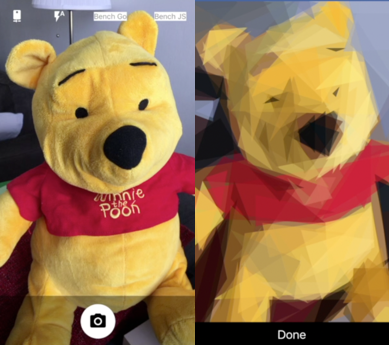
And this is how it will looks like live (video is on fast-speed):

Since the core algorithm is native, and built in Go, we’ll use it as-is. But to be clear, if we had to build this algorithm or any other algorithm or piece of infrastructure that must be native, and we didn’t have an existing codebase already, we had a hard decision to make:
- Build it twice in Java and Obj-C.
- Once in C/C++.
- Once in Go.
Actually, for this particular use case and algorithm, we tick even more items from the “why go native” list above:
- Performance. Go will exhibit better performance than Javascript (we’ll see by how much later). We need it here, since primitive is a demanding cpu-based algorithm. Actually, it’s so demanding that it makes processing these images on a strong iPhone slow. Go is closer to the metal here and makes a good case to use it instead of Javascript.
- Using a library that doesn’t exist on npm. And this time, because it’s a novel algorithm implemented in Go, and there’s no port of that any where else, I was happy that Go on mobile (and later, I made it work on React Native) works so well.
- Obfuscation. In this case the target Go library we’re using is open source. If it weren’t the case, and you cared about your IP, no one could reverse engineer this algorithm without investing an unreasonable amount of time.
- Native API access. This algorithm can save progress snapshots to disk on every iteration. If this were to be Javascript, we’d have to encode each snapshot and send it over as a big base64 string across the React Native bridge.
And of course, we can use the same native code for both Android and iOS.
The Go Mobile Toolchain
If you’re already familiar with Go as a language, then this will be a nice fresh breeze. If not, to get familiar with Go, check out the Go tour.
After you’ve done that, let’s install and exercise the gomobile toolchain (I assume you’ve installed Go and were able to do a simple “hello world” with it in the meanwhile):
If everything worked well, you should be seeing a mobile app in your simulator. What this mobile toolchain did is build a native iOS library, generate a skeleton app, link these, and package an app. It all happened quietly (or humbly?), that’s part of the Go philosophy: success should be silent; in other words — no news is good news.
I encourage you to read the short Wiki article. To get proper context about these tools.
Connecting React Native and Go Mobile
We start by making a fresh React Native app, and grab the react-native-camera example here. This is a convenient way to get to the point of this article but you may want to build your own from scratch.
We want to build our native Go library now and start by connecting it to our iOS app. This is where it might become tricky because we need to think about our workflow before everything else.
In Go, the best thing to do is develop your Go code in your GOPATH, which is an opinionated place where your Go code and third-party libraries live (there’s a solid logic around that, but it’s out of the scope of this article). And so our first decision is to put our native library there as well — and not alongside our app.
Once nice bonus is that our new Go package is ignorant of the fact that we’ll use it on a mobile device. In fact, you can conveniently work on it as a stand-alone Go app and then decide to bind it to your mobile app when you’re ready.
For me, it lives here (yours will be different):
<home>/workspaces/golang/src/github.com/jondot/primer-bind
The layout is simple:
➜  primer-bind tree .
.
└── primer
    └── prime.go

1 directory, 1 file
Let’s take a look at our Go code:
A quick pass shows that we export OnIterationDone which is a callback like interface we’ll use from each native side and Process which is the entry point to our algorithm. There’s nothing special to do about types passing in and out; go takes care of generating code for marshalling these to the respective mobile platforms.
For Process, I took the CLI code from primitive and hacked it so it would be a function I can export. We also export Bench and JsonDummy for our benchmarking showcase.
You’ll see that in each step in this article, I take the smallest possible step to strategically create code that we can discuss without too much context.
Once this is in place, we have to switch context and cd to our app. We now want to make use of the gomobile toolchain, so we’ll run this:
It will generate a native library for you and spit a lot of detail while doing so because we’re using -x -v; but you can drop these if you like. You can see the beauty of treating every Go code like a package: we supply a path that is both a repo and a local path in your GOPATH, if you didn’t have a local copy, Go would fetch it and build using it, or leave this as-is and it’ll grab my package and compile it so that you wouldn’t have to.
Next up, we’ll have to build a bridge in our native code to glue everything together.
Here, we’re making an RCTEventEmitter because we want to get notified where the native Go algorithm finishes its work. We also wrap our OnIterationDone struct with a nicer Obj-C interface. For where headers sit, it correlates with our Go package (we chose primer).
Observation: this is how you would build a native module regardless of Go. We want to have an async function on the native side that gets variables such as iteration count, size, mode and number of workers and a callback, pass these to our Process function, here called GoPrimerProcess which is automatically generated for us, again it correlates with package name and function name, prefixed by “Go”.
That’s basically it. The Javascript part now kicks in, and again we’ll do this like any other native module glue:
Android
For Android, this will be even easier because we have Android Studio support through a Gradle plugin. Remember, we still have our same Go package implemenation, untouched, in the same place. We need to specify that location in Gradle and wire the Android native bridge in Java.
These would be the same steps to do in any Android and Go app. For more information you can look at the reference project and here.
Like every Android native component in React Native, we have our module which contains the interesting bits and the package which instructs React Native to inject our module in.
Now, our bridge code. The module part:
And the package part:
Our Java module code shows that the Go package magically appears in go.primer and under a pseudo-object called Primer (how convenient!). Note that gomobile generates the Go side for you and is idiomatically lays it like a real Java module.
This completes a grand-tour around: Go, iOS (bridge), Javascript (glue), and Android (bridge).
A Grand Tour
This has been a tour around four languages, doing plumbing work: In Go, we wired the real Go module to make a function which we can export cleanly. On iOS, we built a native module and bridged it to the native library, which isn’t different than any other C library for that matter. In Javascript, we wired the native part to application-side code which isn’t unlike anything we’d do for a regular native module. Closing up, on Android, we set up a nice build configuration and a simple native module bridge.
Most of this investment in plumbing work would be the same if we were to build any native module. The difference here is that now we have a single native, Go based, codebase to work with — and for the long-run this is going to save a ton of time because we don’t need to maintain the same parallel codebases on Android and iOS.
The Performance Question
How does our code perform in Javascript compared to Go? We’ll run a silly benchmark, which probably is misleading for any real-life decision making so don’t take it as a fact and you can try it live in PrimerApp. TL;DR is that Go is 2x faster than Javascript for this and this benchmarks.
Conclusion
Go with React Native is a match made in heaven for the following scenarios:
- You are passionate about Go or already have existing code in Go, or want to share backend Go code with your mobile app. Granted, specifically for that, you also have GopherJS which works exceptionally well.
- You need the performance margin.
- You want the infrastructural robustness and type safety values of Go.
- You want proprietary code to stay safe.
- You don’t want to express ideas in both Obj-C/Swift and Java.
There are certainly more motivation to match Go with React Native but I believe this small list was what you’ll meet day to day. With that, I hope you enjoyed this fusion of technologies and that you’ll come to build something interesting with the ideas I showed you here.
You can find the reference app here and the Go module here.
Also, I’m passionate about obliterating native code duplication. If you need help doing this move, drop me a line at dotan@paracode.com.
Hacker Noon is how hackers start their afternoons. We’re a part of the @AMI family. We are now accepting submissions and happy to discuss advertising & sponsorship opportunities.
If you enjoyed this story, we recommend reading our
