CreateReactApp is a starter project for React that has zero configuration and zero friction bundle of everything that’s great about React, Webpack, and modern Javascript. It’s the new standard for developer experience and ergonomics.
If you’re unfamiliar with it, please do give it a go.
CreateReactApp is not just a developer convenience — it also allows you to go from zero to production builds in seconds. When you generate a new project with it, you’re given a single page app, and a main App page, with an accompanying test, and it builds and deploys perfectly.
From that point on, you can mock up an idea and be done with it or you can install your go-to libraries, and consider your next step with an appropriate application architecture and state management solution.
React Components
No matter what direction you take from a fresh CreateReactApp, you’re probably going to want to build a pile of React components.
A React component can be minimal like this:
But really you probably will find yourself alternating between:
- A functional component (like the one above).
- A
PureComponentwhich you'd use when you know you don't have state. - A stateful component when you know you have a component state.
You’d probably also want to create a test, and a storybook file; a storybook for every component has become as essential as making sure there’s test for every piece of code.
And if you think of those as peripheral assets that follow each component that make your output as engineer a high quality one, that’s probably just the start.
Hygen
Hygen is a fresh take on code generators that’s super suitable for React and Redux projects. It lets you build new generators in a breeze and use them immediately with zero configuration and zero friction, while keeping your generators project-local.
The easiest way to install Hygen on a Mac is with Homebrew:
&&
If you’re on Linux or Windows (or dislike Homebrew), you can install globally with Yarn:
Or locally to run via yarn run:
But really, a global Hygen should work fine, and should save resources and feel faster (speed is a core Hygen feature!).
Your New Workflow
For convenience, Hygen comes with a package manager called hygen-add, where you can install pre-made generator packages.
Packages can be a great starting point that assume everyone share the same set of problems, but you should definitely feel free to give each project its own take of its generators because most probably each project is unique.
The new idea Hygen introduces is that — with all these extra files and extra glue and extra wirings needed for a modern React or Redux app, why manually add those? Let Hygen generate and wire and connect each component you make, and if you’re using Redux, it can do even more.
Let’s start by setting up CreateReactApp and Hygen.
Note that I’ve taken the liberty to include hygen-add and storybook up there, so that we can have a quicker experience.
Let’s make a sample project:
&&
Let’s set up Storybook and install a convenient test renderer for React:
On a separate terminal run your storybook server and open the resulting URL in a browser.
And if you like, run the actual React App (again on a different terminal):
Instead of using many terminals, you can always use a tool like concurrently, Foreman or tmux; I'll leave that to you.
And now, let’s get our CreateReactApp package for Hygen:
That’s it. Let’s see what generators we have available:
And let’s see how the component generator looks like:
)
)
)
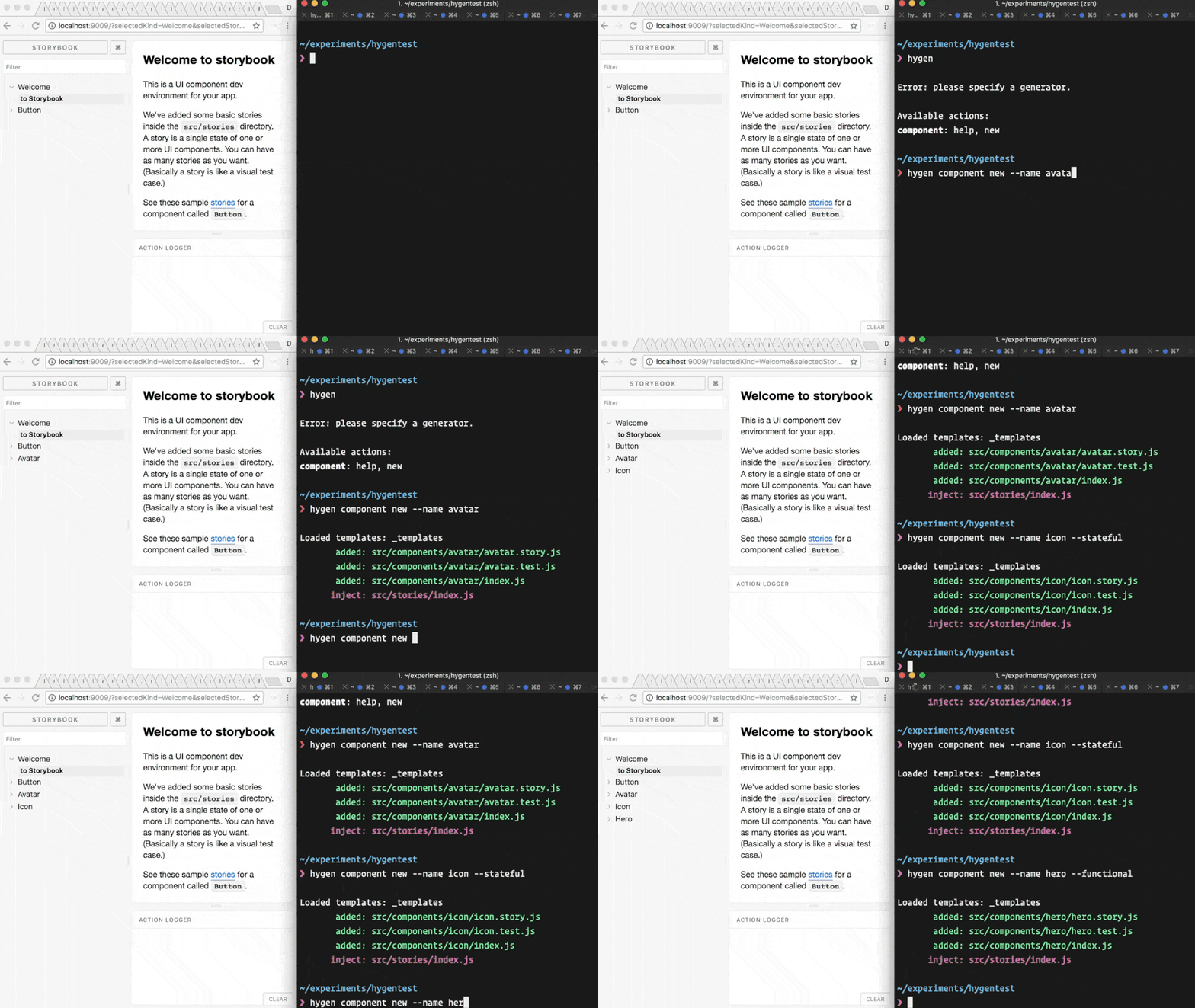
From this point on, to add a new React component to your CreateReactApp based project is just:
And you get a full stack of content for your component; a test, a storybook, and wiring around it.
You’ll also notice Storybook slurps up the new component and automatically updates, I promise this kind of fluidity will really charge up your zone. Check it out:
Should you want to add more aspects to your component, such as a full suite of Redux actions, reducer and so on, you can add them directly to your generator templates folder:
Once you add a new template (say, actions.js.t) its automatically included in the generated code.
For more about this, check out the official Hygen docs about Redux and in general, it’s super useful to understand the primary concepts around Hygen.